> For the complete documentation index, see [llms.txt](https://docs.alemba.com/asm-gaia-10.4/llms.txt). Markdown versions of documentation pages are available by appending `.md` to page URLs; this page is available as [Markdown](https://docs.alemba.com/asm-gaia-10.4/setup-and-configure-asm/installation-and-upgrade/installing-and-upgrading-on-multiple-web-servers.md).
# Installing and upgrading on Multiple Web Servers
You can install Alemba Service Manager™ on more than one web server that all access the same database, and distribute the load using a load balancer, as illustrated below.

To install Alemba Service Manager™ on more than one web server:
1. Install Alemba Service Manager™ on each web server.
2. Create and configure a new system on each of those servers, ensuring they all point to the same database.
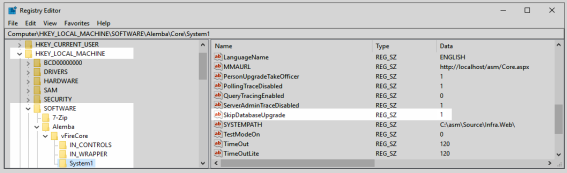
3. On all but one of the servers, disable database upgrade:
* In the registry key, disable the database upgrade using the registry string `SkipDatabaseUpgrade = 1`\
4. Disable each of the ASM polling services on all but one server:
* Stop the ASM service and set the "Start Up" property to **Manual**; except for the ASM Administrative Service.
* Ensure the ASM Administrative Service is running on all servers and its Start Up property is set to **Automatic**.
* Services can be load-balanced. Set a service to Automatic on one server and Manual on all other servers. Each service should only be running on one server.
{% hint style="warning" %}
When **upgrading** in a multi-server environment, run the upgrade once only on the shared database. On the second and subsequent servers, select **No** if prompted to upgrade the database.
{% endhint %}