> For the complete documentation index, see [llms.txt](https://docs.alemba.com/asm-gaia-10.4/llms.txt). Markdown versions of documentation pages are available by appending `.md` to page URLs; this page is available as [Markdown](https://docs.alemba.com/asm-gaia-10.4/use-asm/using-asm-core/getting-started/searching-for-items/viewing-search-results-in-graphs.md).

# Viewing Search Results in Graphs

You can view calls, requests, and tasks in a graphical format from their corresponding Search window.

1. Search on the entity.
2. When the results are displayed in a browse table on the Search results window, select the  button.
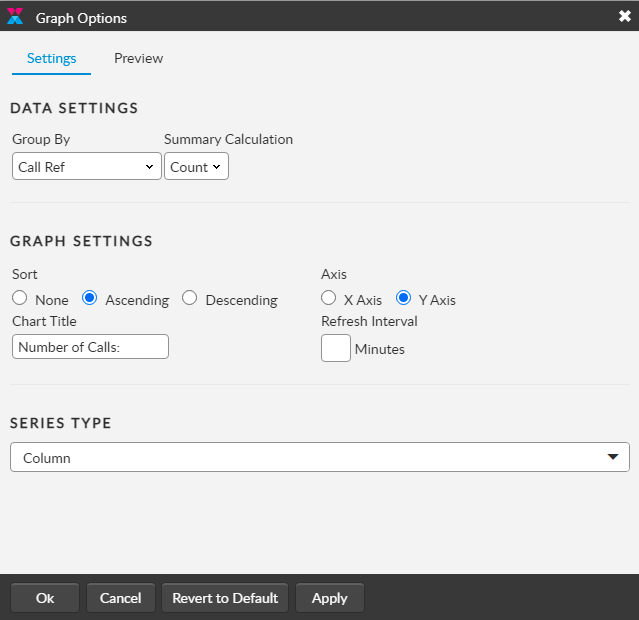
3. The results are displayed in a bar chart and the following options are available:<br>

<table><thead><tr><th width="237">Select</th><th>To...</th></tr></thead><tbody><tr><td><img src="https://content.gitbook.com/content/xP0IZ1PKDWM22PFPFi0l/blobs/uVyvlz3vMr0eG4op2aYS/image.png" alt=""></td><td>Display the results in a table format</td></tr><tr><td><img src="https://content.gitbook.com/content/xP0IZ1PKDWM22PFPFi0l/blobs/si3WmrM6QWMV5l7UVxTN/image.png" alt=""></td><td><p>Choose between different graph formats (<strong>Series Type)</strong>, eg Bar, Line, Pie, and settings.</p><p>Use <strong>Group By</strong> to select the search criterion on which the graph is based.</p><p><strong>Graph Settings</strong> organize the data.</p></td></tr><tr><td><img src="https://content.gitbook.com/content/xP0IZ1PKDWM22PFPFi0l/blobs/0ylg6v1sdQx1WeZaCeb7/image.png" alt=""></td><td>Print the graph</td></tr></tbody></table>

<figure><img src="https://content.gitbook.com/content/xP0IZ1PKDWM22PFPFi0l/blobs/Gp0dtgh4UOlwMRn25DBC/image.png" alt=""><figcaption></figcaption></figure>

4. Select from the options or double-click any section of the graph to open a new search window with search criteria based on the chosen section.