> For the complete documentation index, see [llms.txt](https://docs.alemba.com/asm-hermes/llms.txt). Markdown versions of documentation pages are available by appending `.md` to page URLs; this page is available as [Markdown](https://docs.alemba.com/asm-hermes/itsm-solutions/asm-solutions/user-survey-systems/survey-fields-and-configuration.md).
# Survey Fields and Configuration
## The Default Quantitative Scale
When working with quantitative survey questions, the scale cannot be changed. You can remove options from the control in screen designer that you do not want to use. **ASM enters the value selected into the relevant column in the database.**
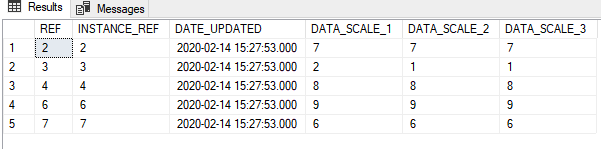
By default, the quantitative scale values (Data Scale 1-10) represent a numerical value from 1-10. The value selected by the user/survey participant for that question on that survey is entered into the database Survey results table. So, if you remove options 6-10, the highest value you will ever see in your data would be, 5. **You cannot change the default scale, you can only remove options from the scale in designer so they cannot be picked**.
For data Scale 1 - User answered 7. The mean score for this question is 6.4
{% hint style="danger" %}
Keep this in mind if you alter quantitative surveys at a later date. Changing the parameters of the quantitative questions could negatively impact your aggregations and analysis if the values of the scale change. It would be best to create a new survey system and deprecate the old one.
{% endhint %}
{% hint style="info" %}
Ensure that when you build your Dashboards and Reports for CSAT, you prepare aggregations that are illustrating the actual weight of responses. A 3 on a scale of 1-10 is very different from a 3 on a scale of 1-4.
{% endhint %}
## Building a Survey Screen
When you build a survey screen, you need to determine if this will be a qualitative survey, or quantitative. Apart from the different field types, building a survey screen is the same as building any other screen.
{% @arcade/embed flowId="eKL2wliI0aeZr9qHp6Yv" url="" %}