> For the complete documentation index, see [llms.txt](https://docs.alemba.com/asm-hermes/llms.txt). Markdown versions of documentation pages are available by appending `.md` to page URLs; this page is available as [Markdown](https://docs.alemba.com/asm-hermes/setup-and-configure-asm/configuring-your-system/system-administration-settings/preview-features-advanced-options/settings/cti/setting-up-the-alemba-service-manager-cti.md).
# Setting up the Alemba Service Manager CTI
For CTI to function, it must be turned on in Alemba Service Manager Administration.
## Enabling CTI for Alemba Service Manager
1. From the main ASM window, click the Admin button and select the System Administration option from the menu that displays. This will open the System Administration window.
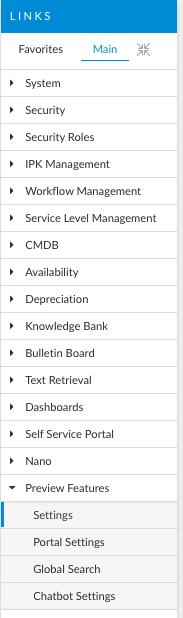
2. From the System Administration window, go to the list of options displayed under the Preview Settings tab and click the Settings option:
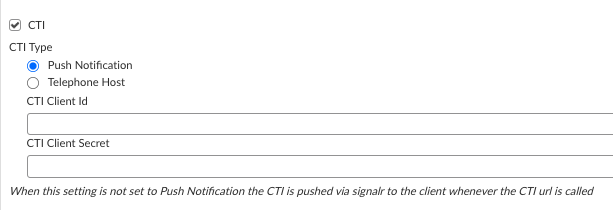
3. In the page that loads to the right, scroll down until you see settings for CTI:
4. To enable CTI, you must tick the "CTI" box. By selecting the CTI option, you will:
* Enable the Caller Info window
* Enable the CTI Caller IDs Explorer option on the customer’s Person Details window
5. Configure **Push**, or **Telephone Host** settings.
{% hint style="info" %}
*When this setting is **not** set to Push Notification, the CTI is pushed via signalR to the client whenever the CTI url is called*
{% endhint %}
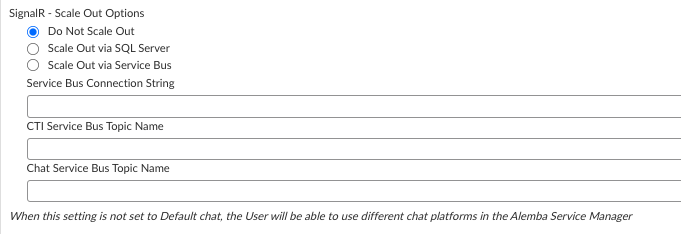
## Configure SignalR
**SignalR** is a free and open-source software library for Microsoft ASP.NET that allows server code to send asynchronous notifications to client-side web applications. While used primarily for load balancing, CTI uses SignalR whenever **Telephone Host** is enabled.
The library includes server-side and client-side JavaScript components. Assuming your server meets the prerequisites, your SignalR should be configured. Please see below for the prerequisites:
{% embed url="" %}
When your CTI is **not set to "Push"** the CTI is pushed via SignalR to the client whenever the CTI URL is called.