# Configuring external network access to ASM

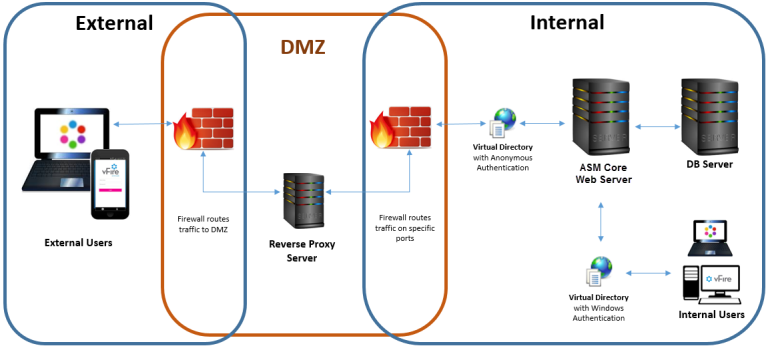
Depending on organizational security requirements, the recommended environment and security configurations may differ. The most common security recommendation is to create a demilitarized zone (DMZ) containing a reverse proxy server buffered by firewalls.

{% hint style="warning" %}
Work with your Network Administration teams to configure reverse proxy servers, DMZ, and IIS redirection.
{% endhint %}

We outline three DMZ scenarios, based on whether or not Windows Authentication is enabled on the ASM System within the secure network:

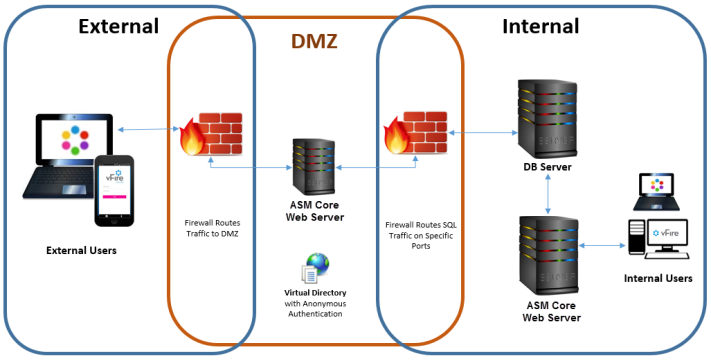
* DMZ with a web server where ASM Core is installed. The ASM System within the secure network may / may not have Windows Authentication enabled.

  For more information, see [Option 1: Install a second ASM System on a web server in the DMZ.](#installsecondindmz)
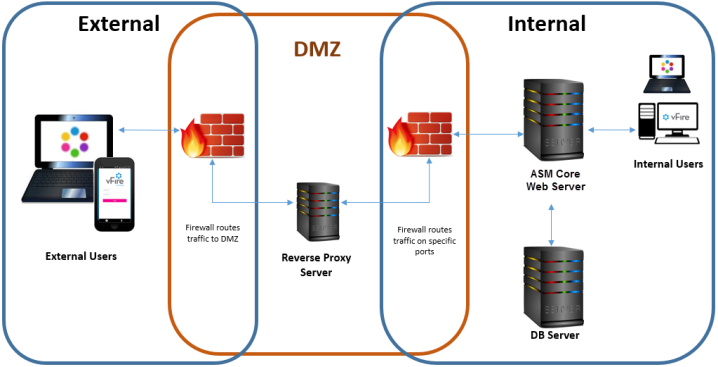
* DMZ with a reverse proxy server. The ASM System within the secure network has Windows Authentication disabled.

  For more information, see [Option 2: Set up a Reverse Proxy Server in the DMZ, Authentication Disabled.](#option2)
* DMZ with a reverse proxy server. The ASM System within the secure network has Windows Authentication enabled.

  For more information, see [Option 3: Set up a Reverse Proxy Server in the DMZ, Authentication Enabled.](#option3)

#### Ports to open in the firewalls

|       | HTTP | HTTPS | SQL                |
| ----- | ---- | ----- | ------------------ |
| Ports | 80   | 443   | TCP 1433, UDP 1434 |

### Option 1: Install a second ASM System on a web server in the DMZ <a href="#installsecondindmz" id="installsecondindmz"></a>

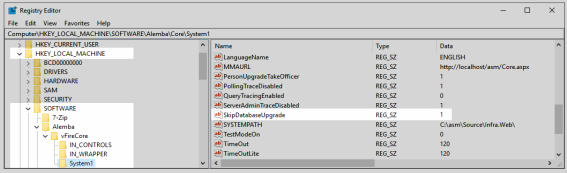
<table data-header-hidden><thead><tr><th width="240.49705239466363"></th><th></th></tr></thead><tbody><tr><td>Internal network</td><td>Install the primary ASM System on the internal server. You may choose to enable Windows Authentication or not; it has no effect on this configuration.</td></tr><tr><td>DMZ</td><td><p>Configure a second web server within the DMZ to act as a reverse proxy server.</p><p>On this web server in the DMZ:</p><ul><li><p>Create an ASM System that points to the same database as the internal ASM System.</p><p><br><mark style="background-color:blue;">During system creation, when prompted to update the database, select <strong>No</strong></mark></p></li><li>In the virtual directory for this system, disable Windows Authentication and enable Anonymous Authentication.</li><li>Stop all ASM Core services and set their "Start Up" property to <strong>Manual</strong>; except for the ASM Administrative Service.</li><li>Ensure the ASM Administrative Service is running and the "Start Up" property is set to <strong>Automatic</strong>.</li><li>Using the registry key, disable the database upgrade via registry string <code>SkipDatabaseUpgrade = 1</code><br><br><img src="https://content.gitbook.com/content/hlW9jKl7dcDggHAPhNU9/blobs/5BaVJ3pUdKxwKuuwt0G9/Registry%20editor.png" alt=""><br></li></ul></td></tr><tr><td>URL for External Users</td><td>The URL points to the server and virtual directory within the DMZ.<br><br><img src="https://content.gitbook.com/content/hlW9jKl7dcDggHAPhNU9/blobs/bZJwIJMpDMkOPSvXKh2U/image.png" alt=""><br></td></tr></tbody></table>

### Option 2: Set up a Reverse Proxy Server in the DMZ, Authentication Disabled <a href="#option2" id="option2"></a>

<table data-header-hidden><thead><tr><th width="234"></th><th></th></tr></thead><tbody><tr><td>Internal network</td><td>Install the primary ASM System on the internal server. Do not enable Windows Authentication.</td></tr><tr><td>DMZ</td><td><p>Configure a reverse proxy server within the DMZ.</p><p>On this server in the DMZ:</p><ul><li>Install IIS</li><li>Create a virtual directory; disable Windows Authentication and enable Anonymous Authentication</li><li>Configure IIS to redirect traffic to the ASM Core application server and virtual directory within the internal secure network.</li></ul></td></tr><tr><td>URL for External Users</td><td>The URL points to the reverse proxy server and virtual directory within the DMZ.<br><br><img src="https://content.gitbook.com/content/hlW9jKl7dcDggHAPhNU9/blobs/5WhdG1HmLM3USfbTjJTO/Reverse%20Proxy%20Auth%20Disabled.png" alt=""></td></tr></tbody></table>

### Option 3: Set up a Reverse Proxy Server in the DMZ, Authentication Enabled <a href="#option3" id="option3"></a>

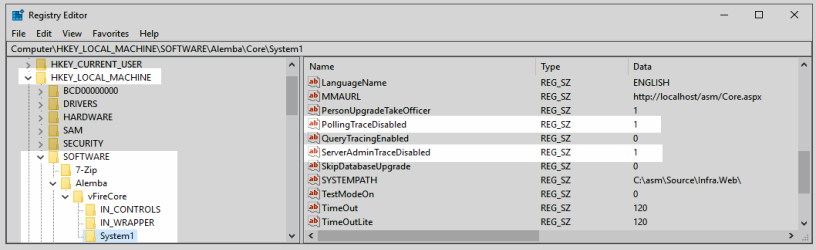
<table data-header-hidden><thead><tr><th width="212"></th><th></th></tr></thead><tbody><tr><td>Internal network</td><td><p>Enable Windows Authentication on the internal server's ASM System.</p><p>On the internal server:</p><ul><li>Create a second ASM System that points to the same database as the primary ASM System.</li><li><mark style="background-color:blue;">During system creation, when prompted to update the database, select <strong>No</strong></mark></li><li>In the virtual directory for the new system, disable Windows Authentication and enable Anonymous Authentication.</li><li>Using the registry key for the new system, disable polling of services via registry string <code>PollingDisabled = 1</code></li><li>Using the registry key for the new system, disable the database upgrade via registry string <code>SkipDatabaseUpgrade = 1</code><br><br><img src="https://content.gitbook.com/content/hlW9jKl7dcDggHAPhNU9/blobs/xYtsUUIRfdnO80iQLveC/image.png" alt=""></li></ul></td></tr><tr><td>DMZ</td><td><p>Configure a reverse proxy server within the DMZ.</p><p>On this server in the DMZ:</p><ul><li>Install IIS</li><li>Create a virtual directory; disable Windows Authentication and enable Anonymous Authentication</li><li>Configure IIS to redirect traffic to the internal application server and the virtual directory that has Anonymous Authentication enabled</li></ul></td></tr><tr><td>URL for External Users</td><td>The URL points to the reverse proxy server and virtual directory within the DMZ.<br><br><img src="https://content.gitbook.com/content/hlW9jKl7dcDggHAPhNU9/blobs/PSfyNv3zJnnswJMhwEAL/Reverse%20Proxy%20Auth%20Enabled.png" alt=""></td></tr></tbody></table>