# Suggested Knowledge in the Self Service Portal

### Suggested Knowledge Articles

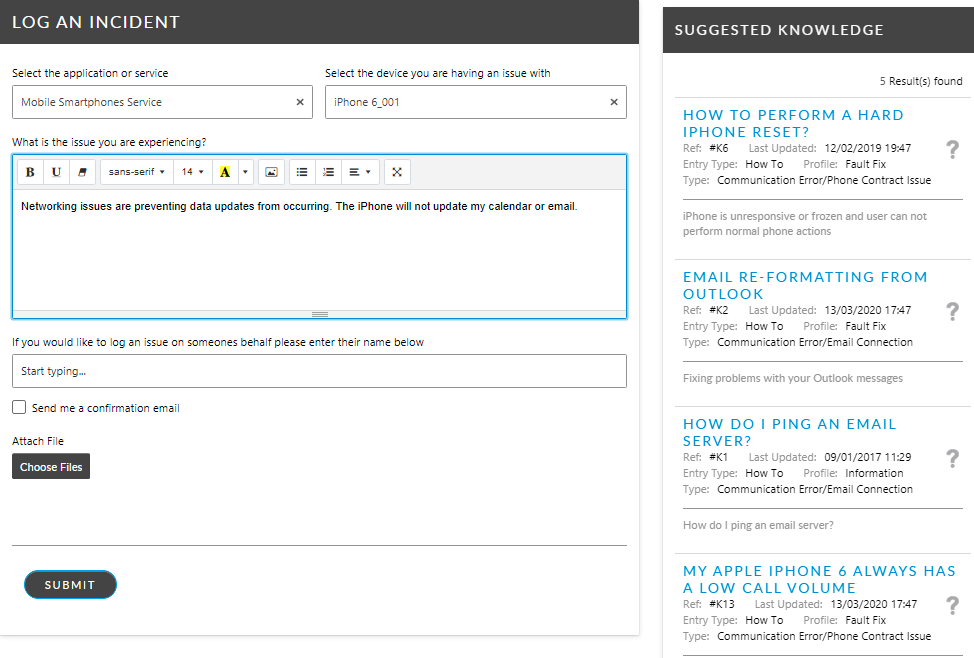
The twenty (20) most relevant articles are returned in Suggested Knowledge.

Knowledge articles are displayed in the Suggested Knowledge widget if they contain text matching the text entered into the call submission form's Description field. If the Description field is unpopulated, then the matching is performed on the Service, and Config Item fields. If there is no data populating any of the four standard fields, no knowledge articles are returned in Suggested Knowledge.

When matching on Description field, knowledge articles are returned which contain any words specified in the submission form's Description field, not necessarily in the same order. This does not include an exact phrase search. Nor will it retrieve text that has another form of the word or a synonym. For example, if entering “Join”, it will not retrieve “Joined” as a match.

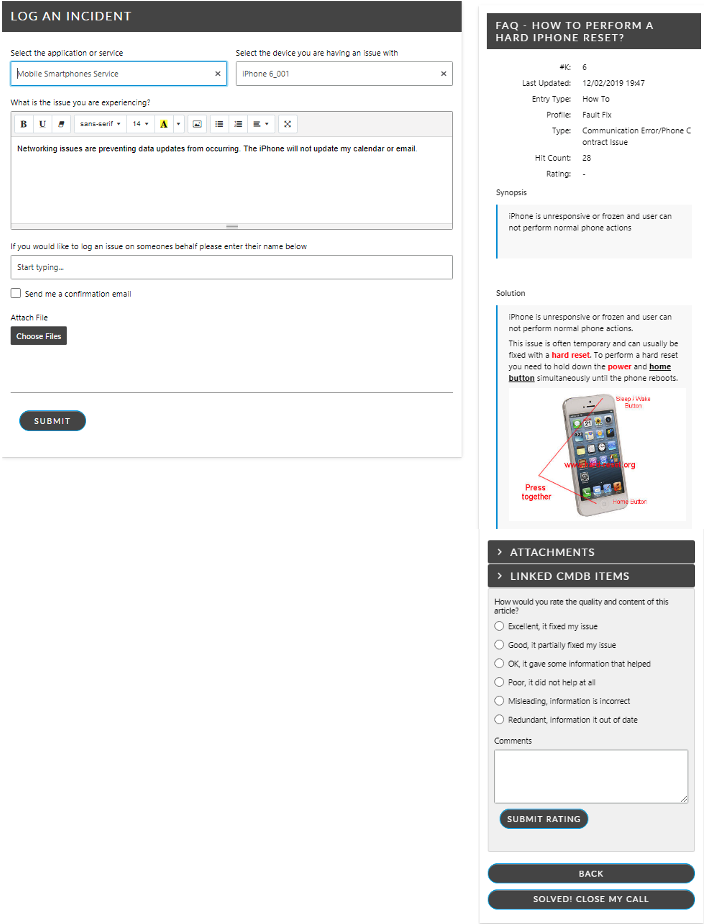
<figure><img src="/files/lqFWweyJEKgPBGZfSChE" alt=""><figcaption><p>Click on the title of the article to see an expanded view</p></figcaption></figure>

### Acknowledging a knowledge article is helpful

Knowledge articles in the Self Service Portal contain a 'help factor' button which enables users to acknowledge the article solved their issue or answered their question. The label of the 'help factor' can be changed in ASM Designer and allows for a different label when the knowledge article is viewed from Suggested Knowledge (where users are logging incidents) and from Knowledge Search (where users are searching for answers to questions).

The default labels for the 'help factor' buttons are:

<table data-header-hidden><thead><tr><th width="283"></th><th></th></tr></thead><tbody><tr><td>Solved! Close my call</td><td>in knowledge articles accessed from Suggested Knowledge widget in the Self Service Portal.</td></tr><tr><td>This was useful</td><td>in knowledge articles accessed from Knowledge Search in the Self Service Portal.</td></tr></tbody></table>

When these buttons are used, the **Help Factor** rating of the knowledge article increases.

The **Help Factor** rating of a knowledge article is visible in the Info Panel of each knowledge article. This value represents the number of times that knowledge article deflected a call in the Self Service Portal or was used to resolve a call by the service desk.

<figure><img src="/files/E6rMRI1aReujWljt9jWe" alt=""><figcaption></figcaption></figure>

### Calls Closed from Suggested Knowledge

When users select **Solved! Close my call**, the following happens:

* The call is submitted and automatically closed.
* Mandatory fields are ignored.
* The user is presented with a screen notifying them the call was submitted and closed, and the details of the call.
* SLA Agreements, Outages, and Reminders are not applied.
* User Surveys are not generated.


---

# Agent Instructions: Querying This Documentation

If you need additional information that is not directly available in this page, you can query the documentation dynamically by asking a question.

Perform an HTTP GET request on the current page URL with the `ask` query parameter:

```
GET https://docs.alemba.com/asm-hermes/use-asm/using-the-self-service-portal/logging-and-reviewing-tickets-and-tasks-approvals/suggested-knowledge-in-the-self-service-portal.md?ask=<question>
```

The question should be specific, self-contained, and written in natural language.
The response will contain a direct answer to the question and relevant excerpts and sources from the documentation.

Use this mechanism when the answer is not explicitly present in the current page, you need clarification or additional context, or you want to retrieve related documentation sections.