# Example Configuration

To implement Service Validation and Testing, you will need to plan out your program.  It is perhaps best to start with a checklist and then compare that against what you already have In ASM.  Below is the configuration that was placed in the product for ITIL V4 compliance.  It may not all work for your organization and that is OK!  Pull from it what is useful.

<details>

<summary>Part 1: Planning Checklist</summary>

* [ ] What are your Test Phases?
* [ ] What Testing will be automated? Does the automated testing tool accept transactions from ASM and can it pass data back to ASM?
* [ ] Will you test in Cycles or Sprints?  What methodology will you use?
* [ ] Who is on the test team?
* [ ] Who has Go-No Go authority?
* [ ] What data is required in each test plan - the standard data that is repeatable across all tests?  This is information we can collect on the screens and validate.
* [ ] What Data is required for the defect log and will you want to automate sending these defects to another system such as Jira?

</details>

<details>

<summary>Part 2: System Administration Settings to Support Testing and Validation</summary>

Once you have roughed in a plan for all the specific information you need for your testing strategy, its time to set the system up to accommodate it.  In our test system, we updated the following:

1. CMDB Item Types.  This is critical since you can then link tests directly to individual requirements along with any defects found against them.
2. In Workflow Management, we created the request screen sets for each kind of test, Functional and non functional along with a screen set for the Test Planning Strategy.&#x20;
3. We also set up the request, or testing, phases in workflow management.

</details>

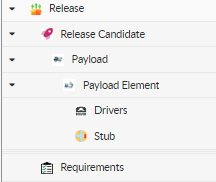
<figure><img src="https://content.gitbook.com/content/hlW9jKl7dcDggHAPhNU9/blobs/r9jN3XmMAXZZKL4LZKgq/image.png" alt=""><figcaption><p>Example: CMDB Item Types for Testing and Release</p></figcaption></figure>

<details>

<summary>Part 3: Screens to Support Testing and Validation</summary>

After you have configured your system, you can begin building your screens to support your test strategy. The basic elements are provided, but using Designer, you can fit them to your organization, specifically.

</details>

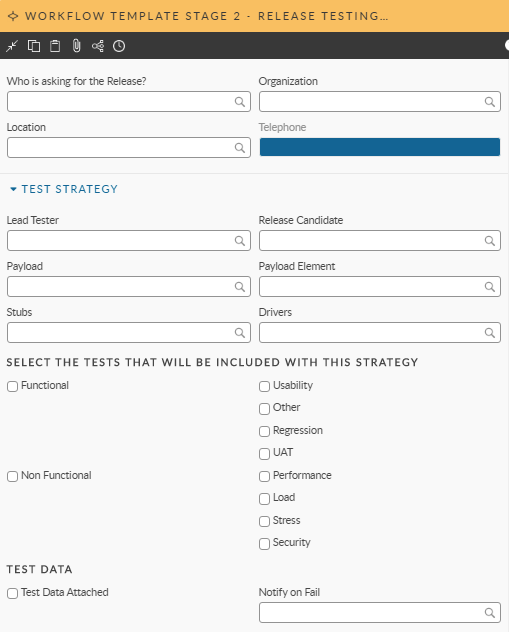
<figure><img src="https://content.gitbook.com/content/hlW9jKl7dcDggHAPhNU9/blobs/ErOSpKzK5Ne511jC30ND/image.png" alt=""><figcaption><p>Example - Test Strategy Request.  This will initiate a new Service Validation and Testing Action.</p></figcaption></figure>

<details>

<summary>Part 4: Workflows to Support Testing and Validation</summary>

Several workflows are already configured to support Service Validation and testing, but you will need to visit each one and alter it to suit your organization and your potential integrations.

</details>

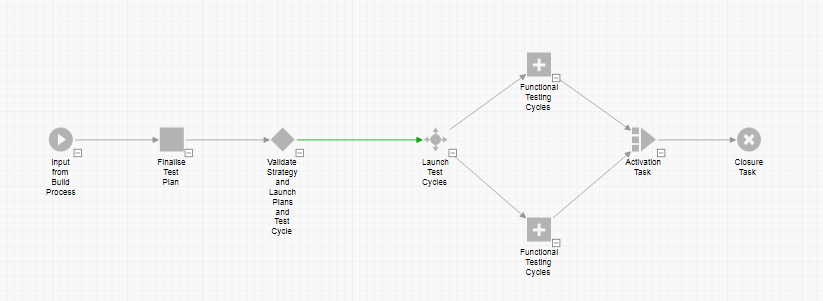
<figure><img src="https://content.gitbook.com/content/hlW9jKl7dcDggHAPhNU9/blobs/5xGeQvpk5pUloJ3BuK0M/image.png" alt=""><figcaption><p>Example: Workflow Template for the Test Strategy - Illustrates how upon approval, the correct sets of tests are initiated</p></figcaption></figure>

<details>

<summary>Part 5: Configuring your Defect Registry and RAID logs</summary>

Following along from screens and System Settings above, if you will track defects in ASM, you will need to configure a screen to do so.  These need not be complicated.  Since the CMDB is tracking Releases, Candidates, Requirements, etc., you can easily use any existing IPK Screen you may have configured and log the ticket against the CI(s) and select the correct Testing Type tier to go with it.  These data are then easily passed to any other external system you may be using.

</details>

<details>

<summary>Part 6: Integrations and Automations</summary>

Planning for your integrations and automation is likely the most extensive part of work you will have when decididing to implement your testing and service validation strategy.  Familiarise yourself with the [R](https://docs.alemba.com/asm/asm-hermes/integrate/apis/alemba-restful-api)[estFul API](https://docs.alemba.com/asm/asm-hermes/integrate/apis/alemba-restful-api), and then as above, make a plan for the data that will passed to and from ASM. &#x20;

</details>